
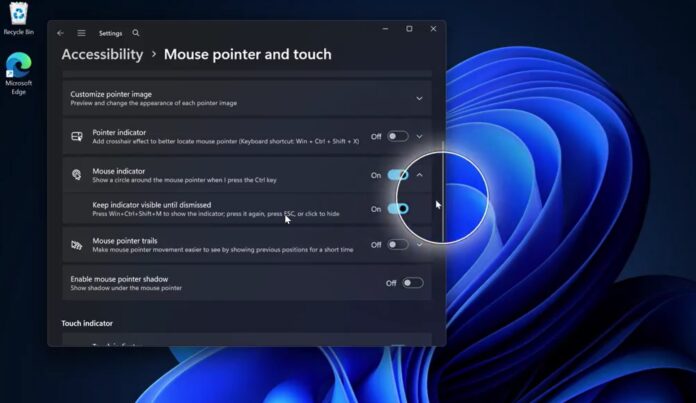
In the 90s, if you couldn’t find the cursor on Windows, you’d rely on the trailing feature and move your mouse around to locate it. In the early 2000s, Microsoft added a feature that lets you press Ctrl to find the cursor, and it became more widely used with Windows XP. That feature has largely remained unchanged, but it’s now being modernized in Windows 11.
If you’re unfamiliar with the feature I’m talking about, openWindows Settings, go toAccessibility, and open theMouse pointer and touchpage. Finally, look for the “Mouse Indicator” toggle and turn it on. Now, press the Ctrl key, and you’ll notice that Windows uses a circle animation to highlight where your cursor is.
It works well enough, although it’s a bit buggy, but it gets the job done: helping you locate your cursor. I used to rely on it often on my 30-inch monitor until I downloaded PowerToys.
Microsoft PowerToys has a similar feature, but it’s far more useful because it dims the entire screen except for the area where the cursor is hiding, and it can be dismissed with Esc.
Now, asPhantomOfEarthfound, Microsoft appears to be adding a PowerToys-like Mouse Indicator experience to Windows 11, and it’s built using modern code.
The modernized Mouse Indicator still opens using the Ctrl key and replaces the legacy implementation. Apart from looking better and feeling more modern, it also introduces an optional feature called“Keep indicator visible until dismissed.”
This means that if you pressWin+Ctrl+Shift+Minstead of just Ctrl, the mouse indicator won’t disappear until you press the shortcut again, press Esc, or click to hide it.
I also noticed that the animation is much smoother, and it’s likely to improve further as it gets closer to the production build.
Microsoft recently promised that it would modernize more corners of Windows 11, but a modern Mouse Indicator was not something I expected. If the company is going after features this small, I wouldn’t be surprised if Windows 11 starts looking much more polished and consistent in terms of UI/UX compared to its predecessors.
The only issue is that most of these improvements are not widely available outside the Windows Insider Program, so the general perception is that nothing is really changing. However, that’s not exactly true. More and more parts of Windows 11 are getting a modern touch, including dialogs like AutoPlay.